
Web APIs#
 API stands for Application Programming Interface. It basically connects applications to work together and share information.
Web APIs enable applications to communicate with each other over the internet by sending and receiving data.
For example, you can request stock price information from Yahoo Finance, weather details from OpenWeather, or Twitter messages from X (formerly Twitter).
Some API services are completely free and can be used without any setup. Others require you to create an account and obtain an API key, even if they are free. Many APIs offer limited free usage, with additional charges for higher usage.
On the landing pages of many websites, you can often find a link to their API information.
Python provides several libraries for working with Web APIs. In this chapter, we will primarily use urllib.
JSON#
JSON stands for JavaScript Object Notation. It is a text-based format used to store structured data.
JSON is commonly used for exchanging data between applications, making it easy to transmit information across different systems.
At first, it may seem complicated, long, and messy, but JSON is actually very easy to read.
It is composed of key-value pairs, where each key is associated with a value.
JSON can be used with any programming language.
Below is an example of how data appears in JSON format:
fhand = open('json_sample.txt')
for line in fhand:
    print(line)
{
"cells": [
{
"cell_type": "markdown",
"id": "d8712b3b-783d-4fee-b9d9-65c3178feb7f",
"metadata": {},
"source": [
"# Numpy Arrays\n",
""
]
},
{
"cell_type": "markdown",
"id": "7d557bc0-854e-4690-a83d-fbbb8a904085",
"metadata": {},
"source": [
"## Missing Parts\n",
"- Vectorized Operations"
]
},
Example: Advice Slip#
https://adviceslip.com/ is a website that provides advice.
Its API can be used to request advice programmatically.
For more information about their API services, visit the following link: Advice Slip API Documentation.
The following libraries will be required:
import urllib.request
import json
Random Advice#
To receive a random advice, the following URL will be used, as provided on the website:
url = 'https://api.adviceslip.com/advice'
In the following code, urllib.request.urlopen() opens the webpage with the given URL (called API endpoint):
It sends an HTTP request to the URL and retrieves the response from the server.
It returns a response object, which contains the server’s response to the request.
This response object can be used to access the content, status code, headers, and other details of the server’s response.
response = urllib.request.urlopen(url)
response
<http.client.HTTPResponse at 0x104a12560>
type(response)
http.client.HTTPResponse
You can then read the content from the response using a for loop line by line or methods like read().
for line in response:
    print(line)
b'{"slip": { "id": 200, "advice": "Sarcasm is the lowest form of wit. Employ correctly with apt timing."}}'
response = urllib.request.urlopen(url)
response.read()
b'{"slip": { "id": 18, "advice": "Don\'t judge a book by its cover, unless it has a synopsis on the back."}}'
The type of the line returned by urllib.request.urlopen() is bytes.
The read() method also returns a byte object.
You can use decode() method to convert it to a string.
To work with the content as a string, you need to decode the bytes.
response = urllib.request.urlopen(url)

for line in response:
    print(f'response: {line.decode()} \n\nTYPE: {type(line.decode())}')
response: {"slip": { "id": 171, "advice": "If you've nothing nice to say, say nothing."}}

TYPE: <class 'str'>
response = urllib.request.urlopen(url)
response.read().decode()
'{"slip": { "id": 205, "advice": "Try to not compliment people on things they don\'t control."}}'
json.loads() is used to convert the response into a Python dictionary.
This makes it easier to access and manipulate the content of the response, as you can use key-value pairs.
response = urllib.request.urlopen(url)
data = json.loads(response.read().decode())
data
{'slip': {'id': 85,
  'advice': "If you don't want something to be public, don't post it on the Internet."}}
type(data)
dict
In the data dictionary, there is a key-value pair where the key is ‘slip’, and the corresponding value is another dictionary.
data['slip']
{'id': 85,
 'advice': "If you don't want something to be public, don't post it on the Internet."}
The second (inner) dictionary contains two key-value pairs with the keys: ‘id’ and ‘advice’.
To access the id number and the advice, you can use the following code:
data['slip']['id']
85
data['slip']['advice']
"If you don't want something to be public, don't post it on the Internet."
Since access issues to URLs are common, it’s recommended to use a try-except statement to handle any potential errors.
This allows the code to handle exceptions such as network errors or HTTP errors without crashing.
import urllib.request
import json

url = 'https://api.adviceslip.com/advice'

try:
    response = urllib.request.urlopen(url)
    data = json.loads(response.read().decode())
    print(f' ID: {data["slip"]["id"]} --- ADVICE: {data["slip"]["advice"]}')
except :
    print(f'Error')
ID: 183 --- ADVICE: Always get two ciders.
Searching Advice#
As stated in the API documentation, advice slips related to a specific search term can be retrieved using the following code:
The primary changes are in the URL, where the search query is included, and the structure of the returned data is slightly different.
In the following example, we will search for advice slips containing the word “always.”
query = "always"
url = f'https://api.adviceslip.com/advice/search/{query}'

response = urllib.request.urlopen(url)
data = json.loads(response.read().decode())
The type of data is a dictionary.
data
{'total_results': '17',
 'query': 'always',
 'slips': [{'id': 9,
   'advice': 'True happiness always resides in the quest.',
   'date': '2015-10-24'},
  {'id': 12, 'advice': 'Always block trolls.', 'date': '2016-11-30'},
  {'id': 13,
   'advice': "If you're feeling tired or anxious, a pint of water will almost always make you feel better.",
   'date': '2016-10-23'},
  {'id': 34,
   'advice': 'To improve productivity, always have a shittier task to put off.',
   'date': '2016-09-26'},
  {'id': 38,
   'advice': 'The most delicious cocktails often have the highest alcohol content. Always pace yourself to preserve your dignity.',
   'date': '2016-09-21'},
  {'id': 42,
   'advice': 'Always double check you actually attached the file to the email.',
   'date': '2017-03-30'},
  {'id': 75,
   'advice': 'You will always regret the round of Tequila.',
   'date': '2015-04-07'},
  {'id': 76,
   'advice': 'You will always regret the round of Jägermeister.',
   'date': '2016-12-19'},
  {'id': 98, 'advice': "It's always the quiet ones.", 'date': '2015-10-04'},
  {'id': 145, 'advice': 'Always the burrito.', 'date': '2015-10-13'},
  {'id': 173, 'advice': 'Always bet on black.', 'date': '2016-11-12'},
  {'id': 178,
   'advice': "It always seems impossible, until it's done.",
   'date': '2017-03-09'},
  {'id': 183, 'advice': 'Always get two ciders.', 'date': '2017-01-01'},
  {'id': 187,
   'advice': 'The sun always shines above the clouds.',
   'date': '2013-01-01'},
  {'id': 190,
   'advice': "Don't always believe what you think.",
   'date': '2016-08-21'},
  {'id': 194,
   'advice': "Don't always rely on your comforts.",
   'date': '2017-01-08'},
  {'id': 207,
   'advice': 'Always seek out advice or opinions when making a decision.',
   'date': '2016-11-05'}]}
Example: Weather Info#
In this example, we will use the Open-Meteo API to access weather information using latitude and longitude.
We will use the latitude and longitude coordinates of California.
The URL contains placeholders for the latitude and longitude values.
import urllib.request
import json
latitude, longitude = 36.7783, -119.4179
url = f'https://api.open-meteo.com/v1/forecast?latitude={latitude}&longitude={longitude}¤t_weather=true'
urllib.request.urlopen() opens the webpage with the given URL
read() returns the response as a byte object, making it readable like a file.
decode() converts the byte response into a string.
json.loads() converts the string response into a dictionary.
response = urllib.request.urlopen(url)
data = json.loads(response.read().decode())
data
{'latitude': 36.765133,
 'longitude': -119.425156,
 'generationtime_ms': 0.8177757263183594,
 'utc_offset_seconds': 0,
 'timezone': 'GMT',
 'timezone_abbreviation': 'GMT',
 'elevation': 144.0,
 'current_weather_units': {'time': 'iso8601',
  'interval': 'seconds',
  'temperature': '°C',
  'windspeed': 'km/h',
  'winddirection': '°',
  'is_day': '',
  'weathercode': 'wmo code'},
 'current_weather': {'time': '2025-01-22T18:30',
  'interval': 900,
  'temperature': 12.1,
  'windspeed': 5.2,
  'winddirection': 286,
  'is_day': 1,
  'weathercode': 0}}
data is a dictionary, and the values corresponding to the keys ‘current_weather_units’ and ‘current_weather’ are both dictionaries.
data.keys()
dict_keys(['latitude', 'longitude', 'generationtime_ms', 'utc_offset_seconds', 'timezone', 'timezone_abbreviation', 'elevation', 'current_weather_units', 'current_weather'])
data['current_weather']
{'time': '2025-01-22T18:30',
 'interval': 900,
 'temperature': 12.1,
 'windspeed': 5.2,
 'winddirection': 286,
 'is_day': 1,
 'weathercode': 0}
data['current_weather_units']
{'time': 'iso8601',
 'interval': 'seconds',
 'temperature': '°C',
 'windspeed': 'km/h',
 'winddirection': '°',
 'is_day': '',
 'weathercode': 'wmo code'}
The temperature and its unit can be combined as follows:
str(data['current_weather']['temperature']) + data['current_weather_units']['temperature']
'12.1°C'
import urllib.request
import json
latitude, longitude = 36.7783, -119.4179
url = f'https://api.open-meteo.com/v1/forecast?latitude={latitude}&longitude={longitude}¤t_weather=true'
try:
response = urllib.request.urlopen(url)
data = json.loads(response.read().decode())
print(f'Temperature: {data["current_weather"]["temperature"]} {data["current_weather_units"]["temperature"]}')
print(f'Windspeed : {data["current_weather"]["windspeed"]} {data["current_weather_units"]["windspeed"]}')
except :
print(f'Error')
Temperature: 12.1 °C
Windspeed  : 5.2 km/h
Hourly Data#
The hourly parameter allows you to retrieve hourly temperature data measured at a height of 2 meters above ground level.
import urllib.request
import json

latitude, longitude = 36.7783, -119.4179
url = f'https://api.open-meteo.com/v1/forecast?latitude={latitude}&longitude={longitude}&hourly=temperature_2m'

response = urllib.request.urlopen(url)
data = json.loads(response.read().decode())
data is a dictionary, and the values corresponding to the keys ‘hoourly’ and ‘temperature_2m’ are both dictionaries.
data
{'latitude': 36.765133,
 'longitude': -119.425156,
 'generationtime_ms': 0.0247955322265625,
 'utc_offset_seconds': 0,
 'timezone': 'GMT',
 'timezone_abbreviation': 'GMT',
 'elevation': 144.0,
 'hourly_units': {'time': 'iso8601', 'temperature_2m': '°C'},
 'hourly': {'time': ['2025-01-22T00:00',
   '2025-01-22T01:00',
   '2025-01-22T02:00',
   '2025-01-22T03:00',
   '2025-01-22T04:00',
   '2025-01-22T05:00',
   '2025-01-22T06:00',
   '2025-01-22T07:00',
   '2025-01-22T08:00',
   '2025-01-22T09:00',
   '2025-01-22T10:00',
   '2025-01-22T11:00',
   '2025-01-22T12:00',
   '2025-01-22T13:00',
   '2025-01-22T14:00',
   '2025-01-22T15:00',
   '2025-01-22T16:00',
   '2025-01-22T17:00',
   '2025-01-22T18:00',
   '2025-01-22T19:00',
   '2025-01-22T20:00',
   '2025-01-22T21:00',
   '2025-01-22T22:00',
   '2025-01-22T23:00',
   '2025-01-23T00:00',
   '2025-01-23T01:00',
   '2025-01-23T02:00',
   '2025-01-23T03:00',
   '2025-01-23T04:00',
   '2025-01-23T05:00',
   '2025-01-23T06:00',
   '2025-01-23T07:00',
   '2025-01-23T08:00',
   '2025-01-23T09:00',
   '2025-01-23T10:00',
   '2025-01-23T11:00',
   '2025-01-23T12:00',
   '2025-01-23T13:00',
   '2025-01-23T14:00',
   '2025-01-23T15:00',
   '2025-01-23T16:00',
   '2025-01-23T17:00',
   '2025-01-23T18:00',
   '2025-01-23T19:00',
   '2025-01-23T20:00',
   '2025-01-23T21:00',
   '2025-01-23T22:00',
   '2025-01-23T23:00',
   '2025-01-24T00:00',
   '2025-01-24T01:00',
   '2025-01-24T02:00',
   '2025-01-24T03:00',
   '2025-01-24T04:00',
   '2025-01-24T05:00',
   '2025-01-24T06:00',
   '2025-01-24T07:00',
   '2025-01-24T08:00',
   '2025-01-24T09:00',
   '2025-01-24T10:00',
   '2025-01-24T11:00',
   '2025-01-24T12:00',
   '2025-01-24T13:00',
   '2025-01-24T14:00',
   '2025-01-24T15:00',
   '2025-01-24T16:00',
   '2025-01-24T17:00',
   '2025-01-24T18:00',
   '2025-01-24T19:00',
   '2025-01-24T20:00',
   '2025-01-24T21:00',
   '2025-01-24T22:00',
   '2025-01-24T23:00',
   '2025-01-25T00:00',
   '2025-01-25T01:00',
   '2025-01-25T02:00',
   '2025-01-25T03:00',
   '2025-01-25T04:00',
   '2025-01-25T05:00',
   '2025-01-25T06:00',
   '2025-01-25T07:00',
   '2025-01-25T08:00',
   '2025-01-25T09:00',
   '2025-01-25T10:00',
   '2025-01-25T11:00',
   '2025-01-25T12:00',
   '2025-01-25T13:00',
   '2025-01-25T14:00',
   '2025-01-25T15:00',
   '2025-01-25T16:00',
   '2025-01-25T17:00',
   '2025-01-25T18:00',
   '2025-01-25T19:00',
   '2025-01-25T20:00',
   '2025-01-25T21:00',
   '2025-01-25T22:00',
   '2025-01-25T23:00',
   '2025-01-26T00:00',
   '2025-01-26T01:00',
   '2025-01-26T02:00',
   '2025-01-26T03:00',
   '2025-01-26T04:00',
   '2025-01-26T05:00',
   '2025-01-26T06:00',
   '2025-01-26T07:00',
   '2025-01-26T08:00',
   '2025-01-26T09:00',
   '2025-01-26T10:00',
   '2025-01-26T11:00',
   '2025-01-26T12:00',
   '2025-01-26T13:00',
   '2025-01-26T14:00',
   '2025-01-26T15:00',
   '2025-01-26T16:00',
   '2025-01-26T17:00',
   '2025-01-26T18:00',
   '2025-01-26T19:00',
   '2025-01-26T20:00',
   '2025-01-26T21:00',
   '2025-01-26T22:00',
   '2025-01-26T23:00',
   '2025-01-27T00:00',
   '2025-01-27T01:00',
   '2025-01-27T02:00',
   '2025-01-27T03:00',
   '2025-01-27T04:00',
   '2025-01-27T05:00',
   '2025-01-27T06:00',
   '2025-01-27T07:00',
   '2025-01-27T08:00',
   '2025-01-27T09:00',
   '2025-01-27T10:00',
   '2025-01-27T11:00',
   '2025-01-27T12:00',
   '2025-01-27T13:00',
   '2025-01-27T14:00',
   '2025-01-27T15:00',
   '2025-01-27T16:00',
   '2025-01-27T17:00',
   '2025-01-27T18:00',
   '2025-01-27T19:00',
   '2025-01-27T20:00',
   '2025-01-27T21:00',
   '2025-01-27T22:00',
   '2025-01-27T23:00',
   '2025-01-28T00:00',
   '2025-01-28T01:00',
   '2025-01-28T02:00',
   '2025-01-28T03:00',
   '2025-01-28T04:00',
   '2025-01-28T05:00',
   '2025-01-28T06:00',
   '2025-01-28T07:00',
   '2025-01-28T08:00',
   '2025-01-28T09:00',
   '2025-01-28T10:00',
   '2025-01-28T11:00',
   '2025-01-28T12:00',
   '2025-01-28T13:00',
   '2025-01-28T14:00',
   '2025-01-28T15:00',
   '2025-01-28T16:00',
   '2025-01-28T17:00',
   '2025-01-28T18:00',
   '2025-01-28T19:00',
   '2025-01-28T20:00',
   '2025-01-28T21:00',
   '2025-01-28T22:00',
   '2025-01-28T23:00'],
  'temperature_2m': [16.3,
   14.1,
   11.8,
   10.3,
   10.0,
   9.6,
   8.8,
   7.0,
   8.0,
   7.5,
   6.8,
   7.2,
   5.9,
   4.7,
   4.0,
   2.0,
   4.8,
   8.9,
   11.1,
   12.9,
   14.2,
   15.5,
   16.3,
   16.6,
   16.2,
   13.5,
   11.1,
   9.8,
   9.5,
   9.3,
   9.1,
   8.9,
   8.9,
   9.3,
   9.2,
   8.4,
   8.2,
   7.9,
   7.9,
   7.8,
   6.1,
   9.1,
   12.8,
   16.1,
   18.2,
   19.3,
   19.8,
   20.0,
   19.3,
   16.1,
   13.9,
   13.6,
   14.0,
   14.1,
   13.1,
   13.6,
   9.5,
   10.3,
   9.5,
   9.8,
   9.9,
   7.3,
   6.9,
   6.6,
   9.2,
   13.5,
   15.4,
   16.8,
   17.8,
   18.5,
   18.8,
   18.6,
   16.9,
   12.5,
   10.9,
   10.9,
   11.0,
   10.5,
   10.5,
   9.8,
   8.9,
   9.4,
   9.9,
   10.3,
   10.0,
   9.1,
   9.6,
   10.4,
   10.3,
   10.6,
   11.8,
   12.9,
   13.4,
   13.4,
   13.6,
   12.5,
   11.7,
   10.5,
   9.9,
   9.8,
   8.6,
   8.4,
   8.4,
   8.0,
   8.2,
   8.4,
   8.1,
   6.7,
   6.3,
   5.9,
   5.9,
   5.2,
   6.5,
   8.7,
   10.3,
   11.5,
   12.4,
   13.1,
   13.4,
   13.9,
   13.3,
   11.4,
   9.9,
   8.6,
   7.0,
   7.3,
   5.8,
   4.8,
   5.2,
   4.6,
   4.5,
   4.4,
   4.7,
   4.2,
   3.6,
   3.7,
   4.8,
   6.6,
   8.2,
   9.4,
   10.4,
   11.1,
   11.7,
   11.9,
   11.5,
   10.0,
   7.9,
   6.3,
   5.8,
   5.7,
   5.6,
   5.2,
   4.8,
   4.4,
   4.2,
   4.0,
   3.8,
   3.1,
   2.5,
   2.7,
   4.6,
   7.3,
   9.7,
   11.1,
   12.0,
   12.6,
   13.1,
   13.3]}}
data[‘hourly’][‘time’] is a list containing dates and times.
data['hourly']['time']
['2025-01-22T00:00',
 '2025-01-22T01:00',
 '2025-01-22T02:00',
 '2025-01-22T03:00',
 '2025-01-22T04:00',
 '2025-01-22T05:00',
 '2025-01-22T06:00',
 '2025-01-22T07:00',
 '2025-01-22T08:00',
 '2025-01-22T09:00',
 '2025-01-22T10:00',
 '2025-01-22T11:00',
 '2025-01-22T12:00',
 '2025-01-22T13:00',
 '2025-01-22T14:00',
 '2025-01-22T15:00',
 '2025-01-22T16:00',
 '2025-01-22T17:00',
 '2025-01-22T18:00',
 '2025-01-22T19:00',
 '2025-01-22T20:00',
 '2025-01-22T21:00',
 '2025-01-22T22:00',
 '2025-01-22T23:00',
 '2025-01-23T00:00',
 '2025-01-23T01:00',
 '2025-01-23T02:00',
 '2025-01-23T03:00',
 '2025-01-23T04:00',
 '2025-01-23T05:00',
 '2025-01-23T06:00',
 '2025-01-23T07:00',
 '2025-01-23T08:00',
 '2025-01-23T09:00',
 '2025-01-23T10:00',
 '2025-01-23T11:00',
 '2025-01-23T12:00',
 '2025-01-23T13:00',
 '2025-01-23T14:00',
 '2025-01-23T15:00',
 '2025-01-23T16:00',
 '2025-01-23T17:00',
 '2025-01-23T18:00',
 '2025-01-23T19:00',
 '2025-01-23T20:00',
 '2025-01-23T21:00',
 '2025-01-23T22:00',
 '2025-01-23T23:00',
 '2025-01-24T00:00',
 '2025-01-24T01:00',
 '2025-01-24T02:00',
 '2025-01-24T03:00',
 '2025-01-24T04:00',
 '2025-01-24T05:00',
 '2025-01-24T06:00',
 '2025-01-24T07:00',
 '2025-01-24T08:00',
 '2025-01-24T09:00',
 '2025-01-24T10:00',
 '2025-01-24T11:00',
 '2025-01-24T12:00',
 '2025-01-24T13:00',
 '2025-01-24T14:00',
 '2025-01-24T15:00',
 '2025-01-24T16:00',
 '2025-01-24T17:00',
 '2025-01-24T18:00',
 '2025-01-24T19:00',
 '2025-01-24T20:00',
 '2025-01-24T21:00',
 '2025-01-24T22:00',
 '2025-01-24T23:00',
 '2025-01-25T00:00',
 '2025-01-25T01:00',
 '2025-01-25T02:00',
 '2025-01-25T03:00',
 '2025-01-25T04:00',
 '2025-01-25T05:00',
 '2025-01-25T06:00',
 '2025-01-25T07:00',
 '2025-01-25T08:00',
 '2025-01-25T09:00',
 '2025-01-25T10:00',
 '2025-01-25T11:00',
 '2025-01-25T12:00',
 '2025-01-25T13:00',
 '2025-01-25T14:00',
 '2025-01-25T15:00',
 '2025-01-25T16:00',
 '2025-01-25T17:00',
 '2025-01-25T18:00',
 '2025-01-25T19:00',
 '2025-01-25T20:00',
 '2025-01-25T21:00',
 '2025-01-25T22:00',
 '2025-01-25T23:00',
 '2025-01-26T00:00',
 '2025-01-26T01:00',
 '2025-01-26T02:00',
 '2025-01-26T03:00',
 '2025-01-26T04:00',
 '2025-01-26T05:00',
 '2025-01-26T06:00',
 '2025-01-26T07:00',
 '2025-01-26T08:00',
 '2025-01-26T09:00',
 '2025-01-26T10:00',
 '2025-01-26T11:00',
 '2025-01-26T12:00',
 '2025-01-26T13:00',
 '2025-01-26T14:00',
 '2025-01-26T15:00',
 '2025-01-26T16:00',
 '2025-01-26T17:00',
 '2025-01-26T18:00',
 '2025-01-26T19:00',
 '2025-01-26T20:00',
 '2025-01-26T21:00',
 '2025-01-26T22:00',
 '2025-01-26T23:00',
 '2025-01-27T00:00',
 '2025-01-27T01:00',
 '2025-01-27T02:00',
 '2025-01-27T03:00',
 '2025-01-27T04:00',
 '2025-01-27T05:00',
 '2025-01-27T06:00',
 '2025-01-27T07:00',
 '2025-01-27T08:00',
 '2025-01-27T09:00',
 '2025-01-27T10:00',
 '2025-01-27T11:00',
 '2025-01-27T12:00',
 '2025-01-27T13:00',
 '2025-01-27T14:00',
 '2025-01-27T15:00',
 '2025-01-27T16:00',
 '2025-01-27T17:00',
 '2025-01-27T18:00',
 '2025-01-27T19:00',
 '2025-01-27T20:00',
 '2025-01-27T21:00',
 '2025-01-27T22:00',
 '2025-01-27T23:00',
 '2025-01-28T00:00',
 '2025-01-28T01:00',
 '2025-01-28T02:00',
 '2025-01-28T03:00',
 '2025-01-28T04:00',
 '2025-01-28T05:00',
 '2025-01-28T06:00',
 '2025-01-28T07:00',
 '2025-01-28T08:00',
 '2025-01-28T09:00',
 '2025-01-28T10:00',
 '2025-01-28T11:00',
 '2025-01-28T12:00',
 '2025-01-28T13:00',
 '2025-01-28T14:00',
 '2025-01-28T15:00',
 '2025-01-28T16:00',
 '2025-01-28T17:00',
 '2025-01-28T18:00',
 '2025-01-28T19:00',
 '2025-01-28T20:00',
 '2025-01-28T21:00',
 '2025-01-28T22:00',
 '2025-01-28T23:00']
This is weekly data, consisting of 7 days, each with 24 hours, totaling 168 hours of data.
len(data['hourly']['time'])
168
data[‘hourly’][‘temperature_2m’] is a list containing temperatures.
data['hourly']['temperature_2m']
[16.3,
 14.1,
 11.8,
 10.3,
 10.0,
 9.6,
 8.8,
 7.0,
 8.0,
 7.5,
 6.8,
 7.2,
 5.9,
 4.7,
 4.0,
 2.0,
 4.8,
 8.9,
 11.1,
 12.9,
 14.2,
 15.5,
 16.3,
 16.6,
 16.2,
 13.5,
 11.1,
 9.8,
 9.5,
 9.3,
 9.1,
 8.9,
 8.9,
 9.3,
 9.2,
 8.4,
 8.2,
 7.9,
 7.9,
 7.8,
 6.1,
 9.1,
 12.8,
 16.1,
 18.2,
 19.3,
 19.8,
 20.0,
 19.3,
 16.1,
 13.9,
 13.6,
 14.0,
 14.1,
 13.1,
 13.6,
 9.5,
 10.3,
 9.5,
 9.8,
 9.9,
 7.3,
 6.9,
 6.6,
 9.2,
 13.5,
 15.4,
 16.8,
 17.8,
 18.5,
 18.8,
 18.6,
 16.9,
 12.5,
 10.9,
 10.9,
 11.0,
 10.5,
 10.5,
 9.8,
 8.9,
 9.4,
 9.9,
 10.3,
 10.0,
 9.1,
 9.6,
 10.4,
 10.3,
 10.6,
 11.8,
 12.9,
 13.4,
 13.4,
 13.6,
 12.5,
 11.7,
 10.5,
 9.9,
 9.8,
 8.6,
 8.4,
 8.4,
 8.0,
 8.2,
 8.4,
 8.1,
 6.7,
 6.3,
 5.9,
 5.9,
 5.2,
 6.5,
 8.7,
 10.3,
 11.5,
 12.4,
 13.1,
 13.4,
 13.9,
 13.3,
 11.4,
 9.9,
 8.6,
 7.0,
 7.3,
 5.8,
 4.8,
 5.2,
 4.6,
 4.5,
 4.4,
 4.7,
 4.2,
 3.6,
 3.7,
 4.8,
 6.6,
 8.2,
 9.4,
 10.4,
 11.1,
 11.7,
 11.9,
 11.5,
 10.0,
 7.9,
 6.3,
 5.8,
 5.7,
 5.6,
 5.2,
 4.8,
 4.4,
 4.2,
 4.0,
 3.8,
 3.1,
 2.5,
 2.7,
 4.6,
 7.3,
 9.7,
 11.1,
 12.0,
 12.6,
 13.1,
 13.3]
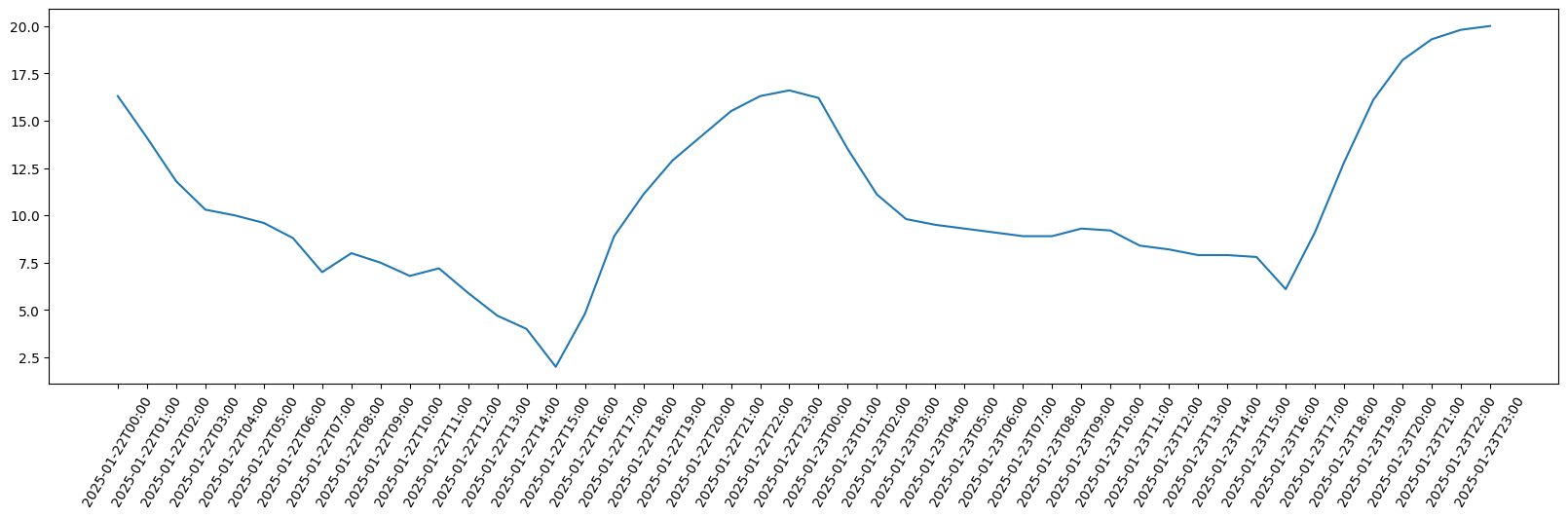
Hourly temperatures for the first two days
import matplotlib.pyplot as plt
plt.figure(figsize=(20,5))
plt.plot(data['hourly']['time'][:24*2], data['hourly']['temperature_2m'][:24*2])
plt.xticks(rotation=60);
Example: Pictures#
In this example, we will use the PicSum AI to access some random pictures.
The last two numbers in the URL represent the dimensions of the image, specifically the width and height in pixels.
url = 'https://picsum.photos/200/300'
The response is an HTTPResponse object, and by using the read() method, we can convert the response content into a bytes object.
import urllib.request
response = urllib.request.urlopen(url)
response
<http.client.HTTPResponse at 0x104a117e0>
Using the imread() method of plt response object is converted to an array.
import matplotlib.pyplot as plt
image_array = plt.imread(response, format="jpeg")
The shape of this array is (300, 200, 3), and it is a 3-dimensional array. The third dimension represents the RGB color channels that will becovered in Numpy Arrays chapter.
image_array.shape
(300, 200, 3)
image_array.ndim
3
image_array[:,:,0]
array([[156, 152, 149, ...,  64,  64,  65],
       [154, 152, 149, ...,  63,  64,  65],
       [152, 150, 149, ...,  63,  64,  64],
       ...,
       [ 20,  20,  20, ...,  48,  53,  56],
       [ 20,  20,  20, ...,  46,  51,  55],
       [ 20,  20,  20, ...,  37,  42,  45]], dtype=uint8)
image_array[:,:,0].shape
(300, 200)
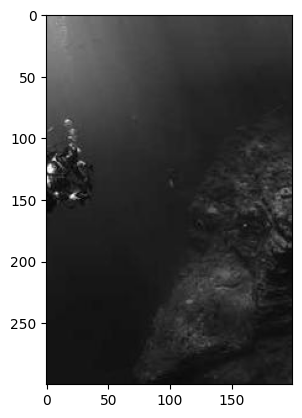
This picture can be displayed using the imshow() method.
plt.imshow(image_array);
This picture can be saved using the imsave() method.
plt.imsave('random_image.png', image_array)
Example: API key#
In this example, we will use the OpenWeather to access weather data.
To proceed, you need to sign up and wait at least 2 hours for your account to be activated.
Once activated, you will receive an API key to make data requests.
First, we construct the URL by including the query parameters such as the city, API key, and measurement units (metric).
city = "London"
api_key = "API KEY"
unit = "metric"

url = f'https://api.openweathermap.org/data/2.5/weather?q={city}&appid={api_key}&units={unit}'
url
Similar to the previous example, the received data is in the form of a dictionary.
response = urllib.request.urlopen(url)
data = json.loads(response.read().decode())
data
{'coord': {'lon': -0.1257, 'lat': 51.5085},
 'weather': [{'id': 804,
   'main': 'Clouds',
   'description': 'overcast clouds',
   'icon': '04n'}],
 'base': 'stations',
 'main': {'temp': 8.53,
  'feels_like': 7.93,
  'temp_min': 6.98,
  'temp_max': 9.44,
  'pressure': 1034,
  'humidity': 92,
  'sea_level': 1034,
  'grnd_level': 1030},
 'visibility': 10000,
 'wind': {'speed': 1.54, 'deg': 200},
 'clouds': {'all': 100},
 'dt': 1736973275,
 'sys': {'type': 2,
  'id': 2075535,
  'country': 'GB',
  'sunrise': 1736927957,
  'sunset': 1736958010},
 'timezone': 0,
 'id': 2643743,
 'name': 'London',
 'cod': 200}
Temperature
str(data['main']['temp'])
'8.53'
Latitude
data['coord']['lat']
51.5085
Longitude
data['coord']['lon']
-0.1257