
DataFrames Advanced Methods#

import pandas as pd
The following dataframes will be used throughout this section.
df1 = pd.DataFrame({'1C1':[3,4,5], '1C2':[30,40,50], 'col':[300,400,500]}, index=['A', 'B', 'C'])
df1
| 1C1 | 1C2 | col | |
|---|---|---|---|
| A | 3 | 30 | 300 |
| B | 4 | 40 | 400 |
| C | 5 | 50 | 500 |
df2 = pd.DataFrame({'2C1':[5,6,9], '2C2':[50,60,90]}, index=['A', 'B', 'C'])
df2
| 2C1 | 2C2 | |
|---|---|---|
| A | 5 | 50 |
| B | 6 | 60 |
| C | 9 | 90 |
df3 = pd.DataFrame({'3C1':[7,8], '3C2':[70,80], 'col':[700,800]}, index=['C', 'D'])
df3
| 3C1 | 3C2 | col | |
|---|---|---|---|
| C | 7 | 70 | 700 |
| D | 8 | 80 | 800 |
concat()#
It is used to concatenate dataframes along an axis (horizontally or vertically).
# default axis=0: add as new rows
# two new rows coming from df3: C and D
pd.concat([df1,df3])
| 1C1 | 1C2 | col | 3C1 | 3C2 | |
|---|---|---|---|---|---|
| A | 3.0 | 30.0 | 300 | NaN | NaN |
| B | 4.0 | 40.0 | 400 | NaN | NaN |
| C | 5.0 | 50.0 | 500 | NaN | NaN |
| C | NaN | NaN | 700 | 7.0 | 70.0 |
| D | NaN | NaN | 800 | 8.0 | 80.0 |
# axis=1, add as new columns
# three more rows are coming from df3: 3C1, 3C2, col
pd.concat([df1,df3], axis=1)
| 1C1 | 1C2 | col | 3C1 | 3C2 | col | |
|---|---|---|---|---|---|---|
| A | 3.0 | 30.0 | 300.0 | NaN | NaN | NaN |
| B | 4.0 | 40.0 | 400.0 | NaN | NaN | NaN |
| C | 5.0 | 50.0 | 500.0 | 7.0 | 70.0 | 700.0 |
| D | NaN | NaN | NaN | 8.0 | 80.0 | 800.0 |
# along only on common columns
pd.concat([df1,df2], join='inner')   # intersection of columns
| A |
|---|
| B |
| C |
| A |
| B |
| C |
If the indexes of two dataframes are the same, the column labels are different, and axis=1, then the second dataframe is concatenated horizontally.
# default axis=1: add as a new row
pd.concat([df1,df2], axis=1)
| 1C1 | 1C2 | col | 2C1 | 2C2 | |
|---|---|---|---|---|---|
| A | 3 | 30 | 300 | 5 | 50 |
| B | 4 | 40 | 400 | 6 | 60 |
| C | 5 | 50 | 500 | 9 | 90 |
shift()#
It is used to shift the data up or down.
df = pd.DataFrame(['A', 'B', 'C', 'D', 'E'])
df
| 0 | |
|---|---|
| 0 | A |
| 1 | B |
| 2 | C |
| 3 | D |
| 4 | E |
# shift the values down by 1 row
df.shift()
| 0 | |
|---|---|
| 0 | None |
| 1 | A |
| 2 | B |
| 3 | C |
| 4 | D |
# shift the values down by 2 rows
df.shift(2)
| 0 | |
|---|---|
| 0 | None |
| 1 | None |
| 2 | A |
| 3 | B |
| 4 | C |
# shift the values up by 1 row
df.shift(-1)
| 0 | |
|---|---|
| 0 | B |
| 1 | C |
| 2 | D |
| 3 | E |
| 4 | None |
# shift the values up by 2 rows
df.shift(-2)
| 0 | |
|---|---|
| 0 | C |
| 1 | D |
| 2 | E |
| 3 | None |
| 4 | None |
pct_change()#
Percentage change between the current and a prior value.
df = pd.DataFrame([500, 400, 600, 150, 180])
df
| 0 | |
|---|---|
| 0 | 500 |
| 1 | 400 |
| 2 | 600 |
| 3 | 150 |
| 4 | 180 |
df.pct_change()
| 0 | |
|---|---|
| 0 | NaN |
| 1 | -0.20 |
| 2 | 0.50 |
| 3 | -0.75 |
| 4 | 0.20 |
rolling()#
It is used to do calculations using a rolling window.
The most commonly used methods following the rolling() method are sum(), mean(), median(), and std().
df
| 0 | |
|---|---|
| 0 | 500 |
| 1 | 400 |
| 2 | 600 |
| 3 | 150 |
| 4 | 180 |
rolling() returns a Rolling object.
The window parameter specifies the size of the moving window and must be provided.
# window=3
type(df.rolling(3))
pandas.core.window.rolling.Rolling
df.rolling(window=3).sum()
| 0 | |
|---|---|
| 0 | NaN |
| 1 | NaN |
| 2 | 1500.0 |
| 3 | 1150.0 |
| 4 | 930.0 |
With a moving window size of 3, the row triplets and corresponding values are as follows:
Rows 0, 1, and 2: The sum of 500, 400, and 600 is 1500.
Rows 1, 2, and 3: The sum of 400, 600, and 150 is 1150.
Rows 2, 3, and 4: The sum of 600, 150, and 180 is 930.
The first two rolling sum values are NaN (not a number) because a minimum of 3 values is required to compute the sum
corr()#
It returns the correlation coefficients of all column pairs.
Let’s find the correlation coefficients for the following DataFrame.
df4 = pd.DataFrame( {'x-values': [1,2,3,4,5], 'square-values': [1,4,9,16,25],'cube-values': [1,8,27,64,125],
                    'random':[9,4,3,1,8], 'reciprocal': [1/1,1/2,1/3,1/4,1/5]})
df4
| x-values | square-values | cube-values | random | reciprocal | |
|---|---|---|---|---|---|
| 0 | 1 | 1 | 1 | 9 | 1.000000 |
| 1 | 2 | 4 | 8 | 4 | 0.500000 |
| 2 | 3 | 9 | 27 | 3 | 0.333333 |
| 3 | 4 | 16 | 64 | 1 | 0.250000 |
| 4 | 5 | 25 | 125 | 8 | 0.200000 |
df4.corr()
| x-values | square-values | cube-values | random | reciprocal | |
|---|---|---|---|---|---|
| x-values | 1.000000 | 0.981105 | 0.943118 | -0.233126 | -0.901754 |
| square-values | 0.981105 | 1.000000 | 0.989216 | -0.053368 | -0.806339 |
| cube-values | 0.943118 | 0.989216 | 1.000000 | 0.088235 | -0.722074 |
| random | -0.233126 | -0.053368 | 0.088235 | 1.000000 | 0.553018 |
| reciprocal | -0.901754 | -0.806339 | -0.722074 | 0.553018 | 1.000000 |
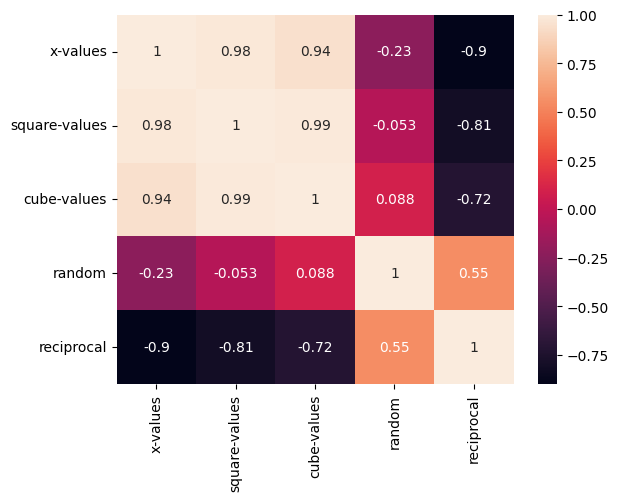
The correlation matrix can be visualized using Seaborn’s heatmap function.
import seaborn as sns
sns.heatmap(df4.corr(), annot=True);
groupby()#
The groupby() function is used to group rows based on column values.
It is commonly used to apply functions, such as calculating the sum, to each group.
df5 = pd.DataFrame({'gender':['M','F','F','M','F'], 'age':[35, 50, 25, 30, 40]})
df5
| gender | age | |
|---|---|---|
| 0 | M | 35 |
| 1 | F | 50 |
| 2 | F | 25 |
| 3 | M | 30 |
| 4 | F | 40 |
The groupby() method below returns a GroupBy object with two groups, corresponding to ‘M’ and ‘F’.
df5.groupby('gender')
<pandas.core.groupby.generic.DataFrameGroupBy object at 0x124ae3d90>
The sum() method below calculates the total of the age values for the ‘M’ and ‘F’ groups.
df5.groupby('gender').sum()
| age | |
|---|---|
| gender | |
| F | 115 |
| M | 65 |
The mean() method below calculates the mean of the age values for the ‘M’ and ‘F’ groups.
df5.groupby('gender').mean()
| age | |
|---|---|
| gender | |
| F | 38.333333 |
| M | 32.500000 |
The count() method below determines the number of samples (rows) in the ‘M’ and ‘F’ groups.
df5.groupby('gender').count()
| age | |
|---|---|
| gender | |
| F | 3 |
| M | 2 |
agg()#
The agg() methodapplies specified functions to values along a given axis.
Syntax: pd.agg(function, axis=0)
df = pd.DataFrame([[7,2], [3,4], [5,6]], columns=['A', 'B'])
df
| A | B | |
|---|---|---|
| 0 | 7 | 2 |
| 1 | 3 | 4 |
| 2 | 5 | 6 |
df.agg('sum')
A    15
B    12
dtype: int64
df.agg('sum', axis=1)
0     9
1     7
2    11
dtype: int64
df.agg(['sum', 'min'])
| A | B | |
|---|---|---|
| sum | 15 | 12 |
| min | 3 | 2 |
df.agg(lambda x: x**2)
| A | B | |
|---|---|---|
| 0 | 49 | 4 |
| 1 | 9 | 16 |
| 2 | 25 | 36 |
df
| A | B | |
|---|---|---|
| 0 | 7 | 2 |
| 1 | 3 | 4 |
| 2 | 5 | 6 |
iterrows()#
The iterrows() method iterates through the rows of a DataFrame, returning each row as an (index, Series) pair.
It returns a generator object.
The index represents the row index in the DataFrame.
df.iterrows()
<generator object DataFrame.iterrows at 0x13480ace0>
list(df.iterrows())
[(0,
  A    7
  B    2
  Name: 0, dtype: int64),
 (1,
  A    3
  B    4
  Name: 1, dtype: int64),
 (2,
  A    5
  B    6
  Name: 2, dtype: int64)]
list(df.iloc[1:,:].iterrows())
[(1,
  A    3
  B    4
  Name: 1, dtype: int64),
 (2,
  A    5
  B    6
  Name: 2, dtype: int64)]
for idx, row in df.iterrows():
    print(idx, row.values)
0 [7 2]
1 [3 4]
2 [5 6]
apply()#
The apply() method is used to apply a function to either rows or columns of a DataFrame.
Syntax: df.apply(function, axis=0)
The default value of axis is 0, meaning the function is applied to each column.
If axis=1, the function is applied to each row.
Additionally, a lambda function can be used within apply() to define the function inline.
We will use the apply() method on the following DataFrame.
df
| A | B | |
|---|---|---|
| 0 | 7 | 2 |
| 1 | 3 | 4 |
| 2 | 5 | 6 |
In the following example, a custom square function is used to compute the square of values in each column.
def square_function(x):
    return x**2
df.apply(square_function)
| A | B | |
|---|---|---|
| 0 | 49 | 4 |
| 1 | 9 | 16 |
| 2 | 25 | 36 |
In the following example, a lambda function is used to define the square function.
df.apply(lambda x: x**2)
| A | B | |
|---|---|---|
| 0 | 49 | 4 |
| 1 | 9 | 16 |
| 2 | 25 | 36 |
In the following example, the sum() function from NumPy is used to compute the sum of values in each column.
import numpy as np
df.apply(np.sum)
A    15
B    12
dtype: int64
In the following example, the sum() function from NumPy is used to compute the sum of values in each row.
df.apply(np.sum, axis=1)
0     9
1     7
2    11
dtype: int64
The following example calculates the weighted sum of particular DataFrame columns using a custom function and a lambda function.
def add_weighted_columns(row):
    return 0.2*row['A'] + 0.8*row['B']

df.apply(add_weighted_columns, axis=1)
0    3.0
1    3.8
2    5.8
dtype: float64
df.apply(lambda row: 0.2*row['A'] + 0.8*row['B'], axis=1)
0    3.0
1    3.8
2    5.8
dtype: float64
at()#
The at() method is used to access a single value from a DataFrame using a specific row and column label pair.
It is similar to loc, but at() is used for retrieving a single value and does not support slicing.
df
| A | B | |
|---|---|---|
| 0 | 7 | 2 |
| 1 | 3 | 4 |
| 2 | 5 | 6 |
df.at[1,'B']
4