
Importing and Storing Data#
In this section, we will explore how to import comma-separated values (CSV) and Excel (XLSX) files into a DataFrame, as well as how to export DataFrames back to CSV or Excel formats using the Pandas library. We will also review the various parameters available to customize the import and export process effectively.
Since we will be using methods from the Pandas library, we first need to import it using:
import pandas as pd
read_csv()#
The read_csv() function reads a comma-separated values (CSV) file and loads it into a DataFrame.
The file path is provided as a string inside the read_csv() function, including the file name and its extension.
In the following code, the CSV file person_info_v1.csv is located in the sample_files folder.
pd.read_csv('sample_files/person_info_v1.csv')
| Name | Birthdate | State | Age | Weight | |
|---|---|---|---|---|---|
| 0 | Amy | 10/25/1972 | NY | 34 | 150 |
| 1 | Joe | 2/5/2010 | NJ | 21 | 175 |
| 2 | Mia | 10/23/2015 | AZ | 67 | 130 |
| 3 | Amy | 11/6/1983 | FL | 19 | 145 |
| 4 | Liz | 4/19/1994 | CA | 29 | 150 |
| 5 | John | 8/29/2023 | OH | 34 | 170 |
index_col#
Specifies which column to use as the index of the DataFrame, using the column’s index number or label.
df = pd.read_csv('sample_files/person_info_v1.csv', index_col=0)
df
| Birthdate | State | Age | Weight | |
|---|---|---|---|---|
| Name | ||||
| Amy | 10/25/1972 | NY | 34 | 150 |
| Joe | 2/5/2010 | NJ | 21 | 175 |
| Mia | 10/23/2015 | AZ | 67 | 130 |
| Amy | 11/6/1983 | FL | 19 | 145 |
| Liz | 4/19/1994 | CA | 29 | 150 |
| John | 8/29/2023 | OH | 34 | 170 |
parse_dates#
Specifies columns to be parsed as Timestamp objects during import.
The values in the Date column are currently stored as strings.
df.loc['Joe', 'Birthdate']
'2/5/2010'
In the following code, Date column values imported as a Timestamp object.
df = pd.read_csv('sample_files/person_info_v1.csv', index_col=0, parse_dates=['Birthdate'])
df
| Birthdate | State | Age | Weight | |
|---|---|---|---|---|
| Name | ||||
| Amy | 1972-10-25 | NY | 34 | 150 |
| Joe | 2010-02-05 | NJ | 21 | 175 |
| Mia | 2015-10-23 | AZ | 67 | 130 |
| Amy | 1983-11-06 | FL | 19 | 145 |
| Liz | 1994-04-19 | CA | 29 | 150 |
| John | 2023-08-29 | OH | 34 | 170 |
df.loc['Joe', 'Birthdate']
Timestamp('2010-02-05 00:00:00')
type(df.loc['Joe', 'Birthdate'])
pandas._libs.tslibs.timestamps.Timestamp
header#
The person_info_v2.csv file contains some unnecessary information in certain cells. As a result, importing the entire file may lead to many missing values.
pd.read_csv('sample_files/person_info_v2.csv')
| Name | Unnamed: 1 | Person Info | Unnamed: 3 | Unnamed: 4 | Unnamed: 5 | Unnamed: 6 | |
|---|---|---|---|---|---|---|---|
| 0 | Birthdate | NaN | N | D | S | A | W |
| 1 | State | NaN | NaN | NaN | NaN | NaN | NaN |
| 2 | Age | NaN | NaN | NaN | NaN | NaN | NaN |
| 3 | Weight | NaN | NaN | NaN | NaN | NaN | NaN |
| 4 | NaN | NaN | Name | Birthdate | State | Age | Weight |
| 5 | NaN | NaN | Amy | 10/25/1972 | NY | 34 | 150 |
| 6 | NaN | NaN | Joe | 2/5/2010 | NJ | 21 | 175 |
| 7 | NaN | NaN | Mia | 10/23/2015 | AZ | 67 | 130 |
| 8 | NaN | NaN | Amy | 11/6/1983 | FL | 19 | 145 |
| 9 | NaN | NaN | Liz | 4/19/1994 | CA | 29 | 150 |
| 10 | NaN | NaN | John | 8/29/2023 | OH | 34 | 170 |
To avoid this, we should import only the relevant data, as demonstrated in the previous section.
First, the header parameter is used to skip the first 5 rows and treat the sixth row (index 5) as the header.
pd.read_csv('sample_files/person_info_v2.csv',header=5)
| Unnamed: 0 | Unnamed: 1 | Name | Birthdate | State | Age | Weight | |
|---|---|---|---|---|---|---|---|
| 0 | NaN | NaN | Amy | 10/25/1972 | NY | 34 | 150 |
| 1 | NaN | NaN | Joe | 2/5/2010 | NJ | 21 | 175 |
| 2 | NaN | NaN | Mia | 10/23/2015 | AZ | 67 | 130 |
| 3 | NaN | NaN | Amy | 11/6/1983 | FL | 19 | 145 |
| 4 | NaN | NaN | Liz | 4/19/1994 | CA | 29 | 150 |
| 5 | NaN | NaN | John | 8/29/2023 | OH | 34 | 170 |
The index_col parameter is used to exclude the first two columns and setting third one (index 2) as the index.
pd.read_csv('sample_files/person_info_v2.csv',header=5, index_col=2)
| Unnamed: 0 | Unnamed: 1 | Birthdate | State | Age | Weight | |
|---|---|---|---|---|---|---|
| Name | ||||||
| Amy | NaN | NaN | 10/25/1972 | NY | 34 | 150 |
| Joe | NaN | NaN | 2/5/2010 | NJ | 21 | 175 |
| Mia | NaN | NaN | 10/23/2015 | AZ | 67 | 130 |
| Amy | NaN | NaN | 11/6/1983 | FL | 19 | 145 |
| Liz | NaN | NaN | 4/19/1994 | CA | 29 | 150 |
| John | NaN | NaN | 8/29/2023 | OH | 34 | 170 |
The iloc indexer can be used to exclude the first two unnecessary columns by selecting only the desired columns based on their integer positions.
pd.read_csv('sample_files/person_info_v2.csv',header=5, index_col=2).iloc[:,2:]
| Birthdate | State | Age | Weight | |
|---|---|---|---|---|
| Name | ||||
| Amy | 10/25/1972 | NY | 34 | 150 |
| Joe | 2/5/2010 | NJ | 21 | 175 |
| Mia | 10/23/2015 | AZ | 67 | 130 |
| Amy | 11/6/1983 | FL | 19 | 145 |
| Liz | 4/19/1994 | CA | 29 | 150 |
| John | 8/29/2023 | OH | 34 | 170 |
usecols#
This parameter is used to specify which columns should be imported from the file.
pd.read_csv('sample_files/person_info_v2.csv',header=5, index_col=0,
            usecols=['Name', 'Birthdate', 'State', 'Age', 'Weight'])
| Birthdate | State | Age | Weight | |
|---|---|---|---|---|
| Name | ||||
| Amy | 10/25/1972 | NY | 34 | 150 |
| Joe | 2/5/2010 | NJ | 21 | 175 |
| Mia | 10/23/2015 | AZ | 67 | 130 |
| Amy | 11/6/1983 | FL | 19 | 145 |
| Liz | 4/19/1994 | CA | 29 | 150 |
| John | 8/29/2023 | OH | 34 | 170 |
read_excel()#
It is similar to the read_csv() method but is used to import data from Excel files.
to_csv()#
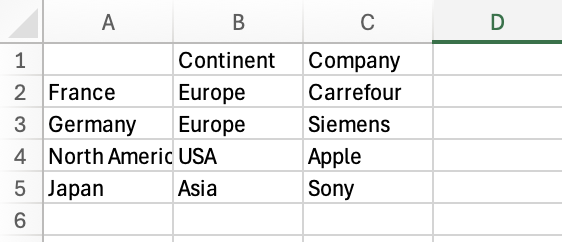
The to_csv() method is used to write a DataFrame to a comma-separated values (CSV) file.
The file path is passed as a string to the to_csv() function, including the file name and its extension.
In the following code, the DataFrame df is saved as a CSV file named countries.csv inside the sample_files folder.
df = pd.DataFrame( index=['France', 'Germany', 'North America', 'Japan'],
                 columns=['Continent', 'Company'],
                 data = [['Europe', 'Carrefour'], ['Europe', 'Siemens'],
                         ['USA', 'Apple'],
                         ['Asia', 'Sony']])
df
| Continent | Company | |
|---|---|---|
| France | Europe | Carrefour |
| Germany | Europe | Siemens |
| North America | USA | Apple |
| Japan | Asia | Sony |
df.to_csv('sample_files/countries.csv')
index#
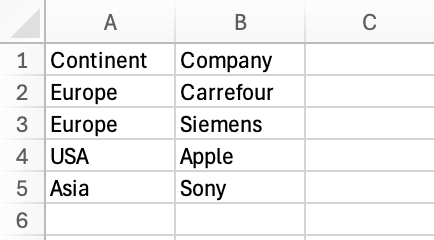
Set the index parameter False to prevent the DataFrame’s index from being written to the output file.
df.to_csv('sample_files/countries.csv', index=False)
columns#
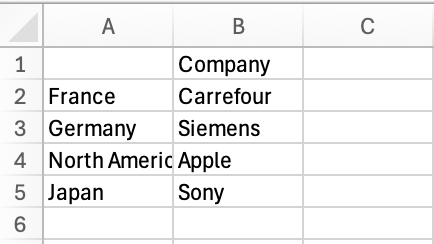
Specifies which columns of the DataFrame should be written to the output file.
df.to_csv('sample_files/countries.csv', columns=['Company'])
header#
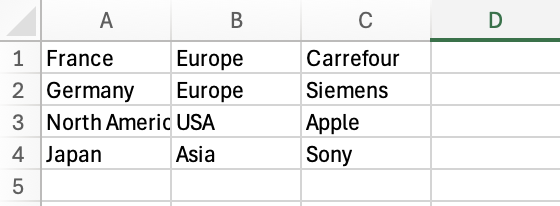
Specifies whether to write column labels to the output file. It can also accept a list of custom labels.
df.to_csv('sample_files/countries.csv', header=False)
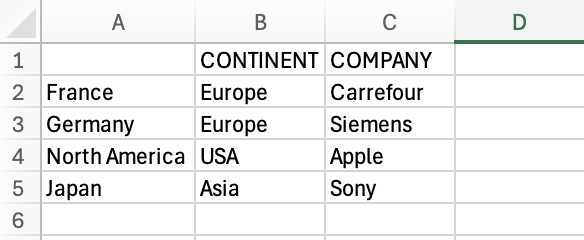
df.to_csv('sample_files/countries.csv', header=['CONTINENT', 'COMPANY'])
to_excel()#
It is similar to the to_csv() method but is used to save data as an Excel files.